Your child wants to trace the characters in their name, with plenty of room to write. Later, you need a page for a few new characters from school. When English lessons begin, you want this week’s words on four-line handwriting guides. The practice changes, but a ready-made workbook rarely matches it exactly.
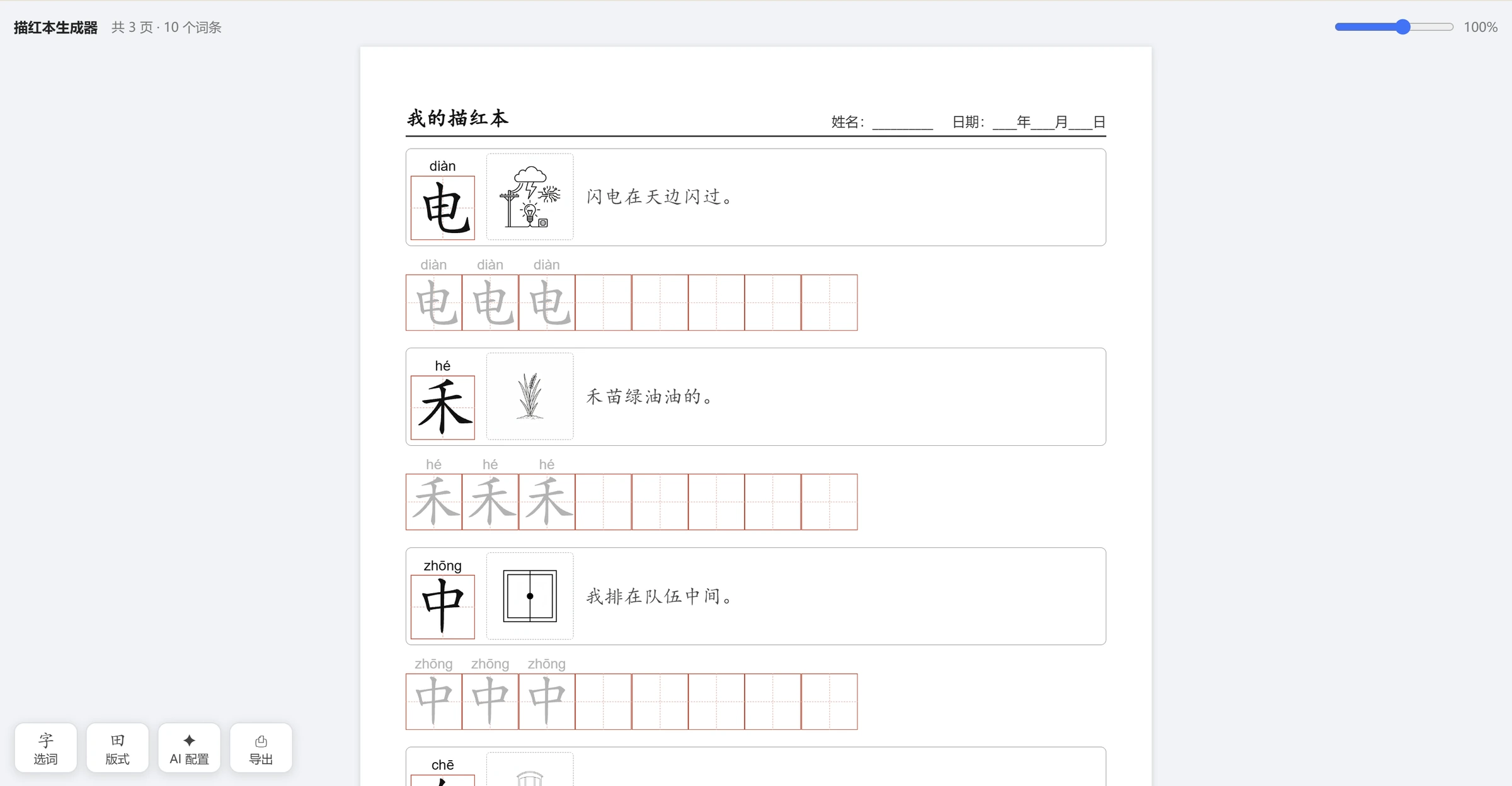
Handwriting Tracing Book Generator lets you choose the words, the size of the writing spaces, the number of tracing examples and the room for independent writing. Chinese and English can share one workbook. Once the preview looks right, it is ready to print.
Make a handwriting worksheet for your child
Start with where your child is now
The ages below are starting points for choosing content and layouts, not a fixed schedule. Children of the same age can have different writing experience. Begin with something your child recognizes and wants to try, then adjust the page as you go.
Around ages 3–5: when letters and characters catch their interest
If your child wants to try tracing, you could start with a character from their name, a familiar simple character or a few English letters. You do not need to fill the page. Choose a small amount of content, larger writing spaces, clear examples and plenty of blank space.
For Chinese, try a larger cross-divided or diagonal practice grid. For English, start with individual letters. You can also add a word card with an uploaded picture, or leave an empty picture box for your child to draw in.
Around ages 5–7: practice what they are learning
As your child encounters new characters, pinyin or English letters, you can put a few items from the day’s learning on one sheet. Show pinyin and stroke-by-stroke guides when useful, followed by tracing examples and some spaces for writing independently.
If today is about their name and a few simple Chinese words, include just those. If tomorrow is about A, B and C, switch to four-line English guides. Model examples, tracing repetitions and blank spaces are adjustable, so a handful of new characters does not require printing an entire workbook.
Primary school, around age 7 and up: follow lessons and revisit words
Once your child has some writing experience, enter new characters from class, words they want to revisit or this week’s English vocabulary. Chinese practice can work character by character or with whole words. English practice supports letters, words and short sentences.
For familiar content, reduce tracing and leave more room for independent writing. For less familiar characters, keep a model, pinyin or stroke-order help. A practiced-word library lets you choose words for review later, or exclude them when selecting new content.
Adjust Chinese and English practice separately
Chinese handwriting worksheets offer cross-divided grids, diagonal grids, nested-box grids and plain squares, with adjustable sizes and columns. Pinyin includes tone marks, and you can correct the reading of a character with more than one pronunciation. Stroke-by-stroke breakdowns and stroke numbers are also available. In the one-character-per-row layout, repeated characters can be included only once, so a repeated character in a word does not need two practice rows.
English handwriting worksheets use four-line guides, with case options and a choice of child-friendly handwriting fonts. Choose light, dotted or outline examples, then adjust repetitions and blank space to suit what your child needs on this page.
Choose from word lists when you need a starting point
You can type your own content or choose from preset lists. Chinese options include common characters, simple standalone characters, poems and idioms. English options include the alphabet, CVC phonics words, Dolch sight words and everyday topics. Pick a few entries, add a whole group or draw a random selection.
Compiled textbook character lists can also help with school practice. Check them against the book your child is using. Selecting a small set for today is often more convenient than adding everything at once.
From word selection to a printed worksheet
- Choose the content for this session. Enter characters, words or English vocabulary, or select them from a preset list. Add meanings, example sentences or pictures if useful.
- Set up the page for your child. Choose Chinese grids or English four-line guides. Adjust writing-space size, model examples, tracing repetitions and blank space, then select the paper size and orientation.
- Check the preview and print. Look at how much content is on each page and how closely it is spaced. Use the print or PDF option to print now or save a copy for later.
Paper options include A4, A5 and Letter. You can add a title, name, date and page numbers. In the browser’s print dialog, match the paper size and orientation, set margins to none and enable background graphics to retain the guides and tracing styles.
Keep a layout that works
Once you have found a useful grid size and amount of practice, save the workbook as a project file. It includes the word list, layout and pictures. Load it next time, replace the words and reuse the layout.
Projects and word history are also stored in the current browser. To move to another computer, export the project and word library separately, then import them on the other device.
Use optional AI for a theme your child likes
If your child is interested in animals, for example, optional AI features can suggest words for that theme and grade level, along with meanings, example sentences or pictures. You can review and edit the suggestions before including them in the workbook.
Manual entry, preset word lists and printing work without AI setup. AI features require your own provider API key and send the relevant content to that provider. Usage limits and charges depend on the provider you choose.